RGB and BMP
作者:罗上文,微信:Loken1,公众号:FFmpeg弦外之音
The color space we encounter most often is RGB. We learned the three primary colors at school: every color can be produced from Red, Green, and Blue.
Web developers also commonly use RGB to specify the color of page elements. RGB formats are mainly divided into two categories:
- Pixel formats. R, G, and B are represented separately with a fixed number of bits. In RGB24, R, G, and B each use 8 bits, so one pixel occupies 24 bits. This can represent
256 * 256 * 256 = 16,777,216colors, but uses a lot of storage. - Indexed formats. The RGB value is an index rather than the actual color. If the index uses 1 bit, it has only the values 0 and 1 and is commonly used for black and white; one pixel then occupies only 1 bit. A lookup table, also called a color palette, maps each index to a color, which need not be black or white. RGB1 uses 1 bit, RGB4 uses 4 bits and a 16-color table, and RGB8 uses 8 bits and a 256-color table.
Additional knowledge: an RGB mode that does not need an index table or palette is called true color.
Overview of the BMP file format
A common file format that uses RGB is BMP. BMP stands for Bitmap File and is an image format developed by Microsoft.
Because BMP is simple, HxD1 is sufficient for examining it. HxD is a powerful hexadecimal viewer. We use it to open juren.bmp:
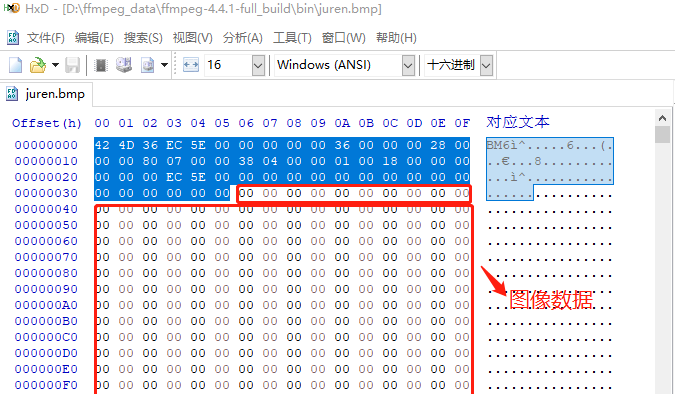
A BMP file consists of:
- The BMP file header (14 bytes), which stores file-level information.
- The BMP information header, usually 40 bytes, which stores image information such as its dimensions.
- The color palette. Its size depends on the color index.
juren.bmpis RGB24 true color, so it has no palette and this region is 0 bytes. - The bitmap data. For
juren.bmp, this is RGB data, with 3 bytes per pixel.
BMP file header
The BMP file header is 14 bytes. Bytes 1-2 are the magic number, BM in this file. These two bytes can also have the following values:
- BM: Windows bitmap
- BA: OS/2 bitmap array
- CI: OS/2 color icon
- CP: OS/2 color pointer
- IC: OS/2 icon
- PT: OS/2 pointer
Bytes 3-6 contain the BMP file size. Here the value is 0x5EEC36. The data is stored little-endian, so when reading HxD you read it from right to left. 0x5EEC36 is 6,220,854 bytes in decimal, matching the file properties:
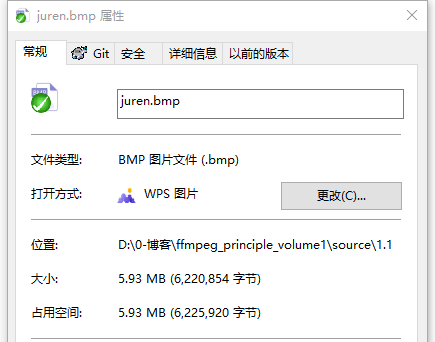
Bytes 7-10 are reserved for future extensions and are currently always zero.
Bytes 11-14 contain the offset of the actual pixel data. Here it is 0x36; without a palette this is usually 0x36, so the actual RGB data starts at byte 54.
BMP information header
The BMP information header starts at byte 15, after the 14-byte file header. Bytes 15-18 contain the size of this header. In juren.bmp they are 0x00000028, or 40 bytes including the size field:
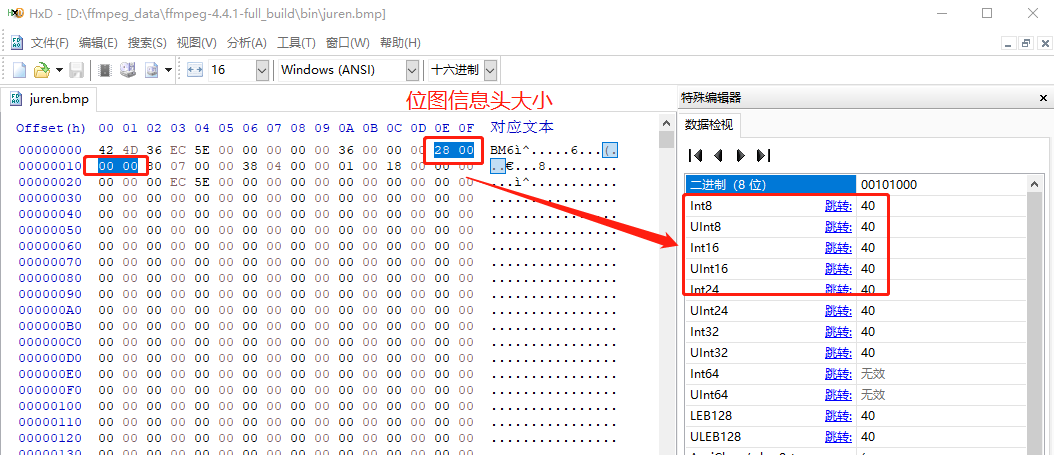
HxD is especially convenient because selecting a value automatically shows its decimal representation.
Bytes 19-22 contain the image width in pixels. Here the value is 0x00000780, or 1920, meaning each row contains 1920 pixels.
Bytes 23-26 contain the image height in pixels. Here the value is 0x00000438, or 1080, meaning there are 1080 rows. Height is signed and can be negative; negative heights are outside the scope of this article.
Bytes 27-28 contain the number of color planes, normally 01.
Bytes 29-30 specify the number of bits per pixel. Here the value is 0x0018, or 24, so juren.bmp is RGB24 and each pixel occupies 24 bits.
Bytes 31-34 contain the compression type. This image is uncompressed, so the value is 0.
Bytes 35-38 contain the image size, excluding the file and information headers. The total file size is 6,220,854 bytes; subtracting the 54-byte header gives the same value as these four bytes:
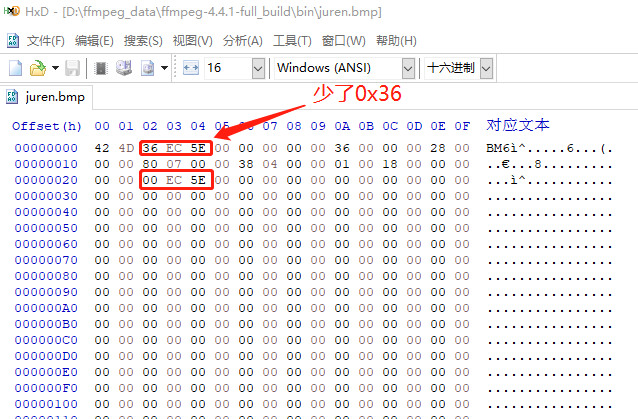
Bytes 39-42 are the horizontal resolution in pixels per meter. They are zero here, so we can ignore them.
Bytes 43-46 are the vertical resolution in pixels per meter. They are zero here as well.
Bytes 47-50 contain the number of color indexes in the color table. This is true color with no index table, so the value is zero.
Bytes 51-54 specify the number of color indexes considered important for displaying the image. The value is zero, meaning all colors are important. This field is irrelevant here because no palette is used.
RGB data
The BMP file header and information header of juren.bmp are now covered. The remaining bytes are the actual RGB values. The first pixel is shown below:
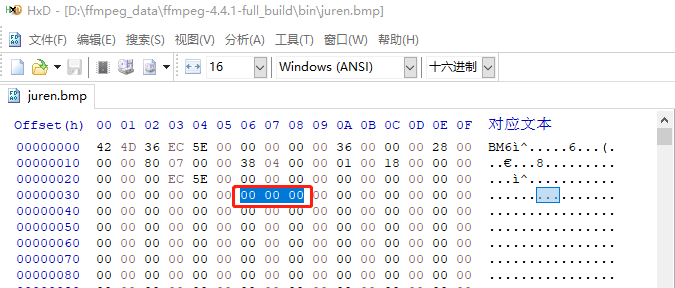
The selected pixel has R = 00, G = 00, and B = 00, so it is pure black. Note that this pixel is the first pixel in the lower-left corner, not the upper-left corner.
Pixels in the file are arranged from the lower left to the upper right. This order is determined by whether the height in the BMP information header is positive or negative.
We can manually change the colors and turn black into white:
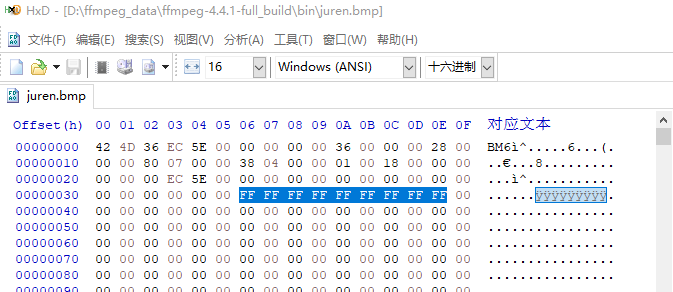
The three lower-left pixels were changed to white. Enlarging juren.bmp reveals the three tiny white pixels:

Remember that RGB24 data is ordered as BGR: the first byte is B, the second is G, and the third is R.
RGB24 true color uses a lot of storage. juren.bmp is about 5 MB, and HxD shows many repeated pixels. These repetitions can be compressed.
Encoding and compressing BMP with FFmpeg
BMP files normally store raw RGB data, so they are often large. For example, juren.bmp is about 5 MB. We can encode and compress the RGB data with:
ffmpeg -i juren.bmp juren.jpg
After JPEG compression, juren.jpg is only 61 KB:
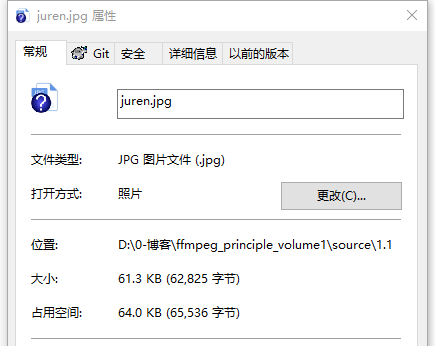
For a detailed introduction to JPEG encoding, see Fundamentals, Standards, and Practice of JPEG2000 Image Compression by David S. Taubman and others; it includes examples of the relevant algorithms.
We can also restore the original BMP data from the JPEG:
ffmpeg -i juren.jpg juren.bmp
1. HxD is a freeware hex and disk editor: https://mh-nexus.de/en/hxd/ ↩