FLV Container Format
作者:罗上文,微信:Loken1,公众号:FFmpeg弦外之音
FLV is one of the simpler container formats. This book proceeds from simple to complex, so we will start with it.
Whether it is FLV or another container format, 99% of it is binary data. To understand these binary formats, first find a useful analysis tool, such as FlvAnalyzer or flvparse.
Use one of these tools to open a real FLV media file, for example, juren-30s.flv. Combining what you see with online articles and the standard makes it possible to quickly become familiar with the FLV container format. The same method can be used to study other containers.
This learning method is called investigating things: first study a concrete object, then summarize and generalize the theory after reaching a certain level of understanding. Discussing theory alone is too abstract. I learned this idea from Zhang Yinkui, the author of Software Debugging.
The FLV specification is video_file_format_spec_v10.pdf; readers are encouraged to give it a quick read first. This article uses FlvAnalyzer and the media file juren-30s.flv.
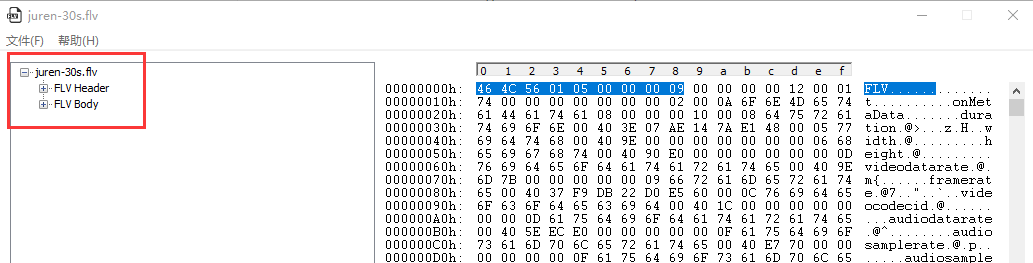
When we open juren-30s.flv with FlvAnalyzer, we can see that an FLV file consists of a Header and a Body, as follows:
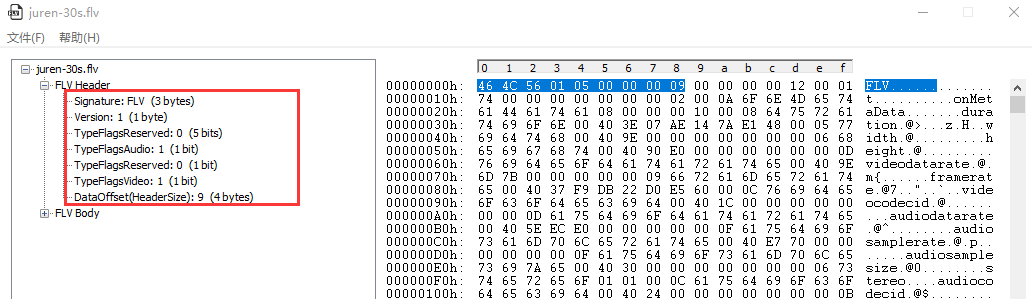
FLV Header
The FLV Header occupies 9 bytes in total. Its fields are:
- The first 3 bytes are the numeric values corresponding to the ASCII characters in FLV.
TypeFlagsAudioandTypeFlagsVideoindicate whether this FLV file contains audio and video, respectively.- The
DataOffsetfield indicates the position at which theFLV Bodydata begins. Because theFLV Bodyfollows theFLV Header, theDataOffsetfield is the header size.
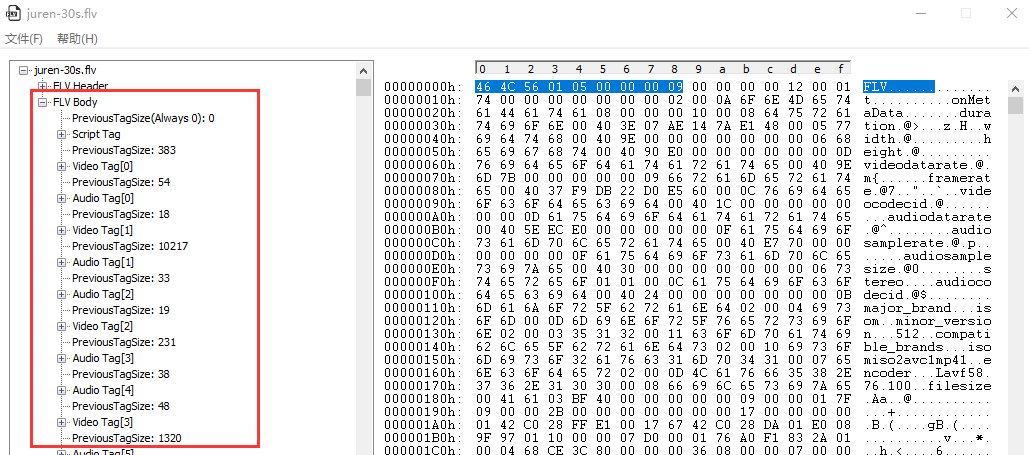
FLV Body
The FLV Body consists of multiple Tags, with the following structure:
FLV body = PreviousTagSize0 + Tag1 + PreviousTagSize1 + Tag2 + ... + PreviousTagSizeN-1 + TagN
Note: PreviousTagSizeN is the size of the previous Tag.
A Tag is further divided into two parts, Tag Header + Tag Data, as follows:
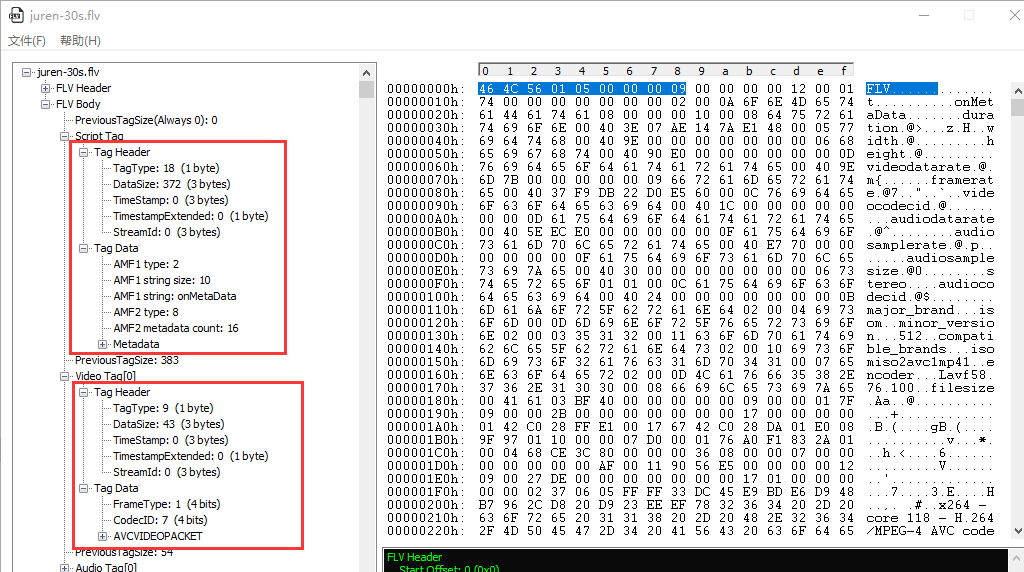
Tag Header
1. TagType, the type. There are three main types:
- Script Tag:
TagTypeequals 18. There is only one such tag, at the beginning of the file. It mainly stores basic file information such as frame rate, sample rate, and duration. - Video Tag:
TagTypeequals 9 and stores video data, usually one video frame. - Audio Tag:
TagTypeequals 8 and stores audio data, usually one audio frame.
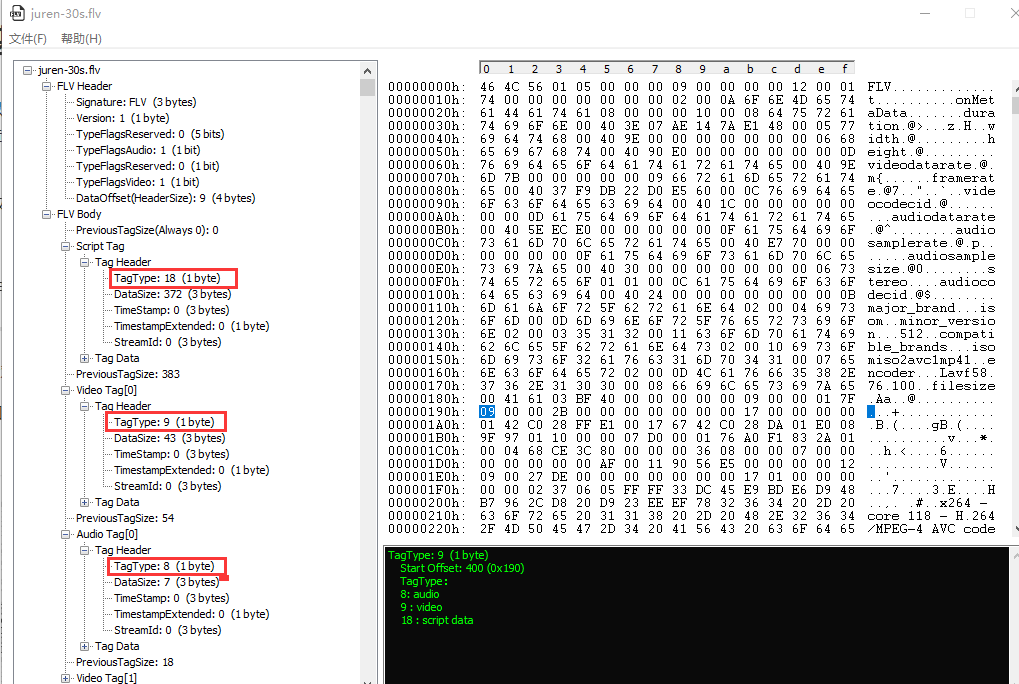
2. DataSize, the size of the following Tag Data section.
3. TimeStamp, occupying 3 bytes, is the decoding time of the current video or audio frame.
4. TimeStampExtended, occupying 1 byte, extends the decoding time. Because the TimeStamp field has only 3 bytes, TimeStampExtended is needed when they cannot hold the dts (decoding time); it becomes the most significant byte.
5. StreamId, a field that is always 0. Its purpose is not discussed here.
Tag Data
The fields in Tag Data are not fixed; they are determined by the TagType in the Tag Header.
1. Script Tag
When TagType equals 18 (Script Tag), Tag Data consists entirely of AMF packets. AMF stands for Action Message Format.
The file juren-30s.flv contains two AMF packets, AMF1 and AMF2, as shown below:
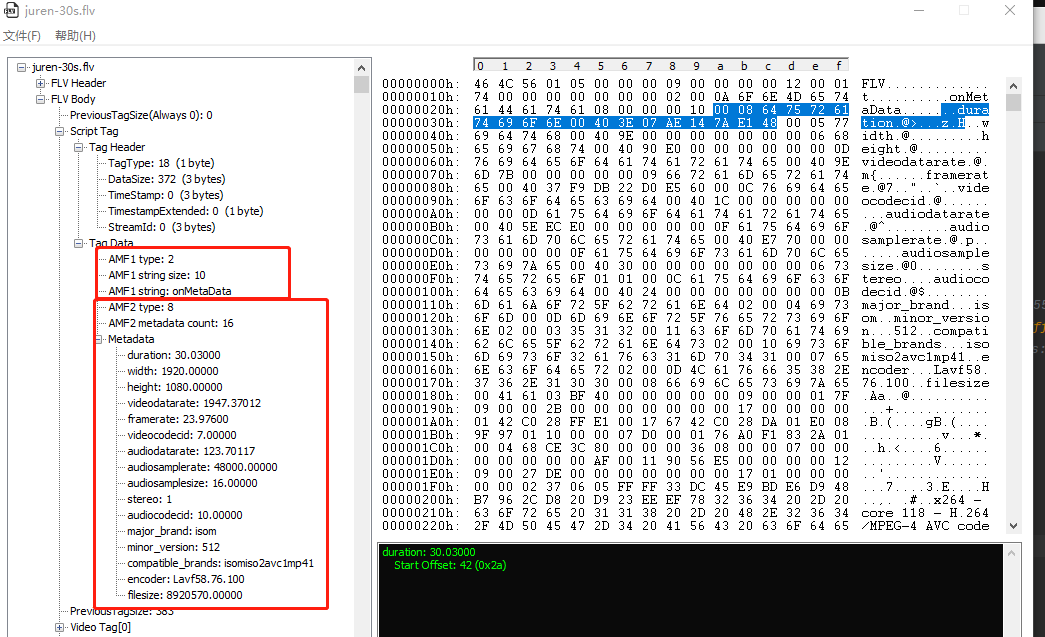
Note that the Metadata shown above also belongs to the AMF2 packet.
The type of AMF1 is 2, meaning that it is a String packet. Its String size is 10, meaning that the string is 10 bytes; onMetaData is exactly 10 bytes long.
The type of AMF2 is 8, meaning that it is an array packet. The metadata count is 16, meaning that the array has length 16; MetaData contains exactly 16 key-value pairs.
The parsing rules for these key-value pairs are as follows: the key is always a string, and the preceding 2 bytes give the string length:
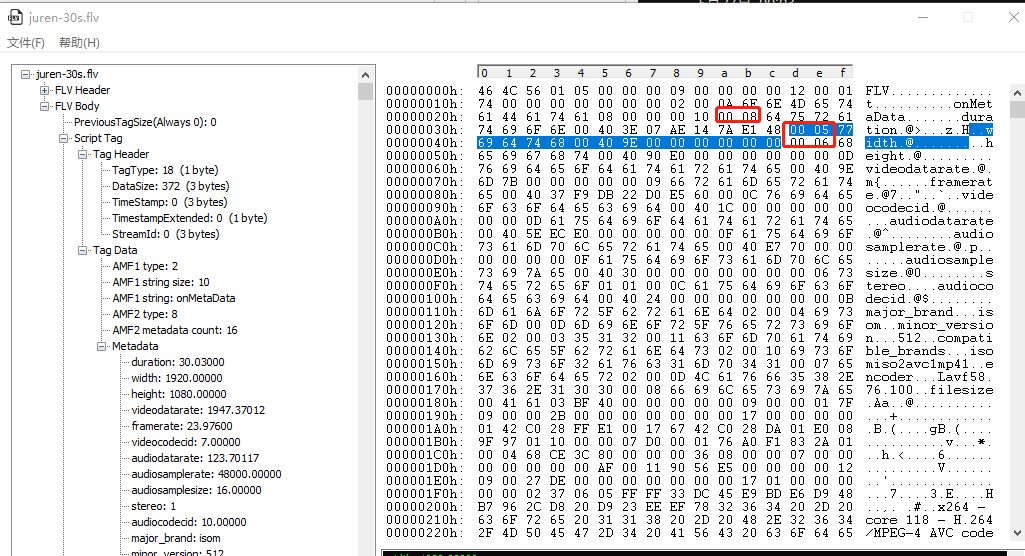
08 is the length of duration, 05 is the length of width, and 06 is the length of height, and so on.
The first byte after the key string is the value type. There are several value types, defined in FFmpeg as follows:
typedef enum {
    AMF_DATA_TYPE_NUMBER      = 0x00,
    AMF_DATA_TYPE_BOOL        = 0x01,
    AMF_DATA_TYPE_STRING      = 0x02,
    AMF_DATA_TYPE_OBJECT      = 0x03,
    AMF_DATA_TYPE_NULL        = 0x05,
    AMF_DATA_TYPE_UNDEFINED   = 0x06,
    AMF_DATA_TYPE_REFERENCE   = 0x07,
    AMF_DATA_TYPE_MIXEDARRAY  = 0x08,
    AMF_DATA_TYPE_OBJECT_END  = 0x09,
    AMF_DATA_TYPE_ARRAY       = 0x0a,
    AMF_DATA_TYPE_DATE        = 0x0b,
    AMF_DATA_TYPE_LONG_STRING = 0x0c,
    AMF_DATA_TYPE_UNSUPPORTED = 0x0d,
} AMFDataType;
If the value type is AMF_DATA_TYPE_NUMBER, value occupies 8 bytes and stores a floating-point number.
If the value type is AMF_DATA_TYPE_BOOL, value occupies 1 byte and stores 0 or 1.
If the value type is AMF_DATA_TYPE_STRING, value occupies x bytes, xxx
In short, the byte size of value is determined by its type. The detailed code parsing is explained in 《flv_read_packet reading AVPacket》.
2. Video Tag
When TagType equals 9 (Video Tag), two fields in Tag Data are fixed: FrameType and CodecID, each occupying 4 bits:
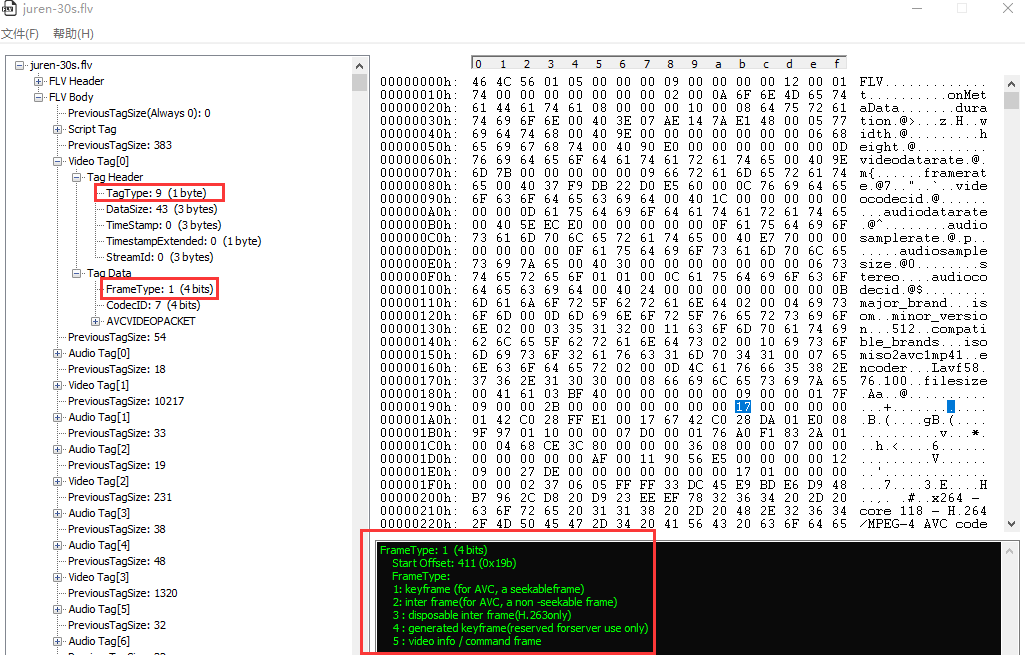
CodecID identifies the coding standard in use:
CodecID:
    1: JPEG (currently unused)
    2: Sorenson H.263
    3 : Screen video
    4 : On2 VP6
    5 : On2 VP6 with alpha channel
    6 : Screen video version 2
    7 : AVC
The CodecID of juren-30s.flv in this article is 7, so it uses H.264 encoding.
FrameType has five values:
FrameType:
    1: keyframe (for AVC, a seekableframe)
    2: inter frame(for AVC, a non -seekable frame)
    3 : disposable inter frame(H.263only)
    4 : generated keyframe(reserved forserver use only)
    5 : video info / command frame
Although the FrameType in the figure above is 1, its Tag Data contains codec configuration information, not a keyframe. AVCPacketType is also needed to determine this, as follows:
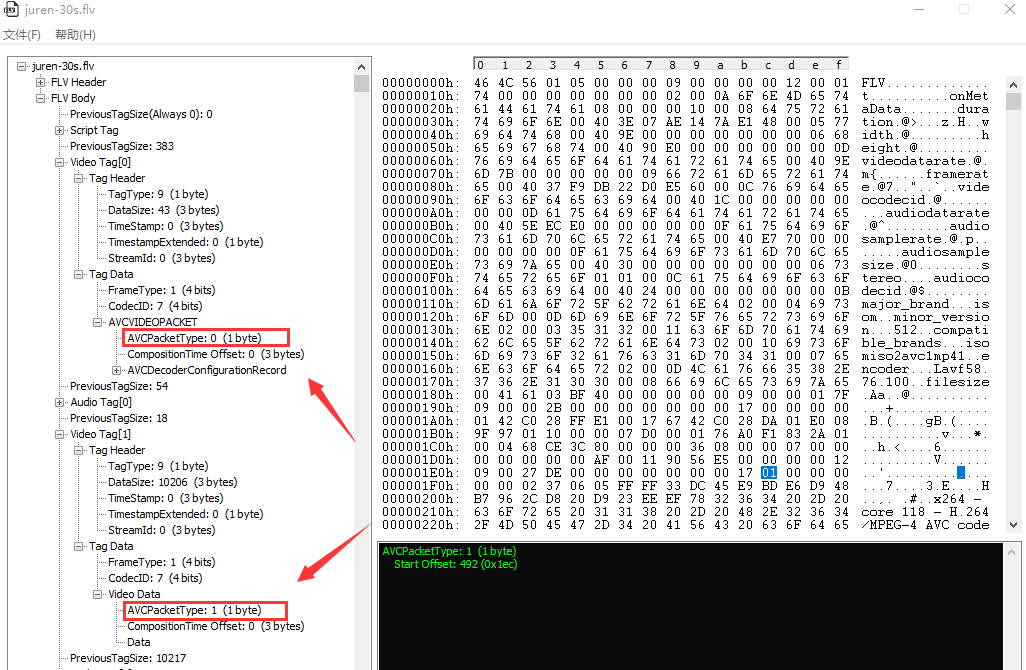
When CodecID is 7 (AVC), AVCPacketType has three values:
AVCPacketTypeequals 0: the following data is an AVC sequence header.AVCPacketTypeequals 1: the following data is an AVC NALU unit.AVCPacketTypeequals 2: the AVC sequence ends.
The CompositionTime Offset in Video Data is a time offset used to calculate the PTS when B-frames are present. The TimeStamp in the Tag Header is the decoding time; adding the CompositionTime Offset gives the PTS.
3. Audio Tag
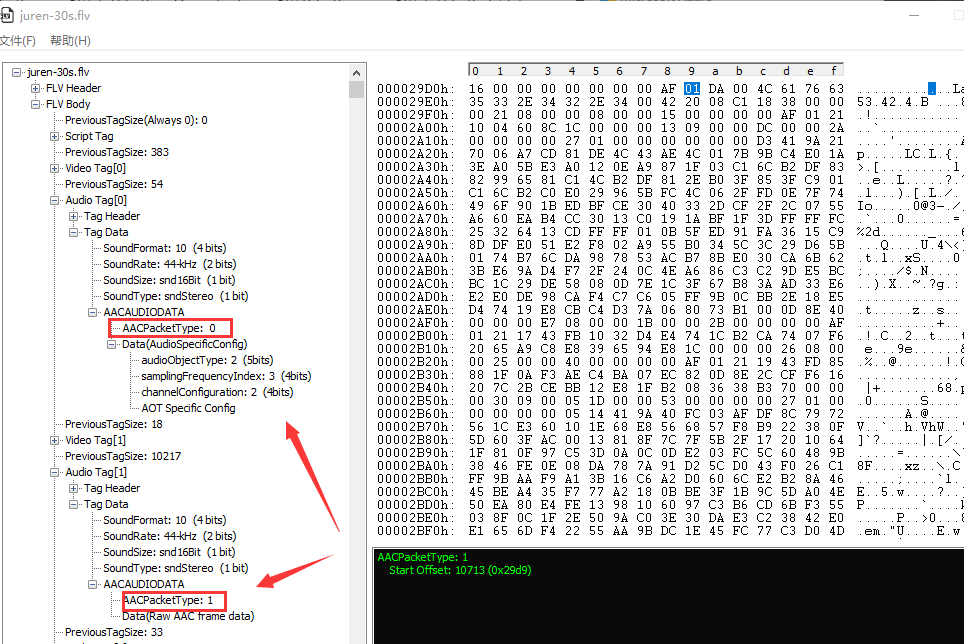
When TagType equals 8 (Audio Tag), four fields in Tag Data are fixed:
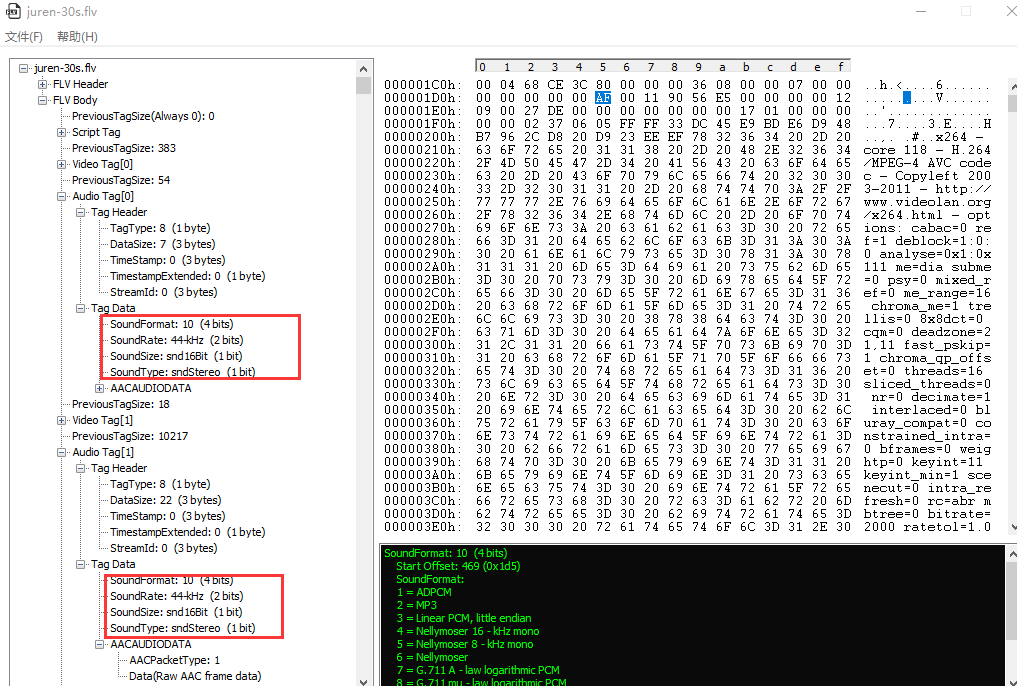
The four fields above are parsed as follows:
SoundFormat: the audio format. In practice, it identifies the type of data in Tag Data, which may be AAC-encoded data or MP3-encoded data:
SoundFormat:  (4 bits)
    Start Offset: 469 (0x1d5)
    SoundFormat:
    1 = ADPCM
    2 = MP3
    3 = Linear PCM, little endian
    4 = Nellymoser 16 - kHz mono
    5 = Nellymoser 8 - kHz mono
    6 = Nellymoser
    7 = G.711 A - law logarithmic PCM
    8 = G.711 mu - law logarithmic PCM
    9 = reserved
    10 = AAC
    11 = Speex
    14 = MP3 8 - Khz
    15 = Device - specific sound
The SoundFormat of the FLV file in this article is 10, so its Audio Tags contain AAC-encoded data.
SoundRate: the sample rate, with four possible values:
SoundRate: (2 bits)
    0 = 5.5-kHz
    1 = 11 - kHz
    2 = 22 - kHz
    3 = 44 - kHz
SoundSize: the sample depth. 0 represents 8-bit samples, and 1 represents 16-bit samples.
SoundSize:  (1 bit)
    0 = snd8Bit
    1 = snd16Bit
SoundType: the channel layout. 0 represents mono, and 1 represents stereo.
SoundType:  (1 bit)
    0 = sndMono
    1 = sndStereo
Every Audio Tag contains these four fields, SoundFormat, SoundRate, SoundSize, and SoundType. In my opinion, this is somewhat redundant because their values are always the same.
When SoundFormat equals 10 (AAC), AACAUDIODATA contains an AACPacketType with two possible values:
- When
AACPacketTypeequals 0, this isAudioSpecificConfig(the sequence header).AudioSpecificConfigappears only in the firstAudio Tag. - When
AACPacketTypeequals 1, this is AAC raw frame data, that is, the raw AAC stream.